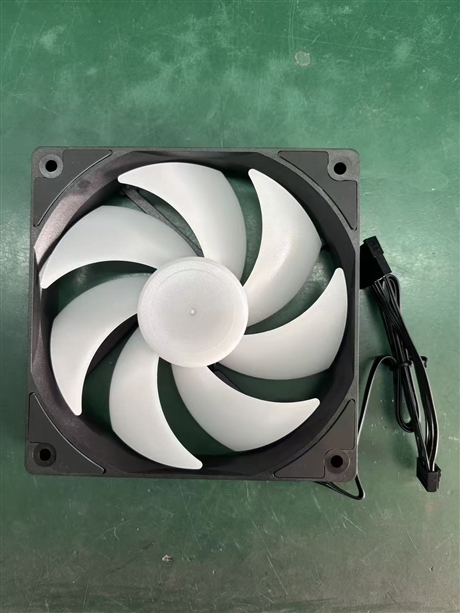

120mm computer case RGB cooling fan, silent high air volume desktop computer heat sink
Category:
Digital computer/Computer accessories/Computer fan
Model:
twelve thousand and twenty-five
Brand:
Lixing Sheng
fan size:
120x120x25mm
rated voltage:
DC 12V
interface type:
4Pin PWM / 5V ARGB
bearing type:
Hydraulic bearings
speed range:
800-1800 RPM
Maximum Airflow:
65 CFM
noise value:
≤25 dBA
Number of fan blades:
7 leaves
Applicable scenarios:
Chassis intake and exhaust/CPU water-cooled exhaust
Retail Price
10,000,000.00USD
重量
kg
- Product Description
-
fan size 120x120x25mm
rated voltage DC 12V
interface type 4Pin PWM / 5V ARGB
bearing type Hydraulic bearings
speed range 800-1800 RPM
Maximum Airflow 65 CFM
noise value ≤25 dBA
Number of fan blades 7 leaves
Applicable scenarios Chassis intake and exhaust/CPU water-cooled exhaust
Description :
The 120mm computer cooling fan is an efficient air convection component designed specifically for desktop computer cases and CPU heat sinks. It mainly solves the problem of frequency reduction or system crashes caused by hardware heat accumulation under high loads. This category uses high-speed rotating blades to push airflow, quickly dissipating the heat inside the chassis while inhaling external cold air to maintain the motherboard, graphics card, and processor operating within a suitable temperature range. Typical working conditions include high heat scenarios such as daily office work, large-scale game rendering, and long-term video editing, which are essential components for ensuring the stability of computer systems.
The standard size of the computer cooling fan is usually 120x120x25mm, which is compatible with most standard ATX and M-ATX chassis reserved holes. The fan blades are mostly made of PBT or ABS engineering plastics, which have high strength and aging resistance characteristics, and the frame structure is stable. The common types of bearings are oil containing bearings, hydraulic bearings, or double ball bearings, which directly affect their service life and noise control. The implementation standard refers to the relevant electronic industry specifications of SJ/T, and the electrical parameters are usually DC 12V power supply with a current range of 0.15A-0.3A. RGB light beads are integrated into the frame or fan axis, supporting 5V ARGB or 12V RGB signal input, and need to be synchronized with the motherboard software to achieve light effect control.
When selecting, it is important to pay attention to the balance between air volume (CFM) and air pressure (mmH2O). The front air inlet position focuses on high air volume for quick ventilation, while the rear or top air outlet position and water-cooled exhaust require high air pressure to penetrate dense fins. If there is a high requirement for quietness, hydraulic bearings or fluid dynamic bearing versions should be prioritized, and the speed should be controlled within the variable range of 800-1500RPM. Pay attention to distinguishing between the 3-pin fixed speed interface and the 4-pin PWM temperature control interface. The latter can automatically adjust the speed according to the CPU temperature, balancing heat dissipation efficiency and silent experience. Non standard size chassis require confirmation of installation hole spacing to avoid compatibility issues.
When installing a computer cooling fan, attention should be paid to the direction of airflow. Usually, there are arrows on the side of the frame indicating the wind direction and shaft rotation direction. It is recommended to build a "front down air inlet, rear up air outlet" air duct logic. When fixing screws, they should be tightened diagonally and evenly to avoid resonance noise caused by frame deformation. It is recommended to clean the dust on the fan blades every six months for daily maintenance. Excessive dust accumulation can significantly increase the motor load and reduce heat dissipation efficiency. If there is abnormal noise or stoppage, it is mostly caused by bearing wear or cable entanglement, and should be replaced in a timely manner to prevent hardware overheating and damage. Regularly check if the RGB connection wires are loose to ensure that the light synchronization function is functioning properly.
AfterSalesService :
Key words:
More Products